an up-to-date view on Guix's package status/version across distros, please see:
https://repology.org/project/guix/versions
-### Debian 11 (Bullseye)/Ubuntu 21.04 (Hirsute Hippo)
+### Debian / Ubuntu
Guix v1.2.0 is available as a distribution package starting in [Debian
11](https://packages.debian.org/bullseye/guix) and [Ubuntu
-21.04](https://packages.ubuntu.com/hirsute/guix).
+21.04](https://packages.ubuntu.com/search?keywords=guix).
Note that if you intend on using Guix without using any substitutes (more
details [here][security-model]), v1.2.0 has a known problem when building GnuTLS
2. Or, check their build directory's length beforehand
- For those building with `makepkg`: `pwd | wc -c`
-## Option 4: Building from source
+## Option 5: Building from source
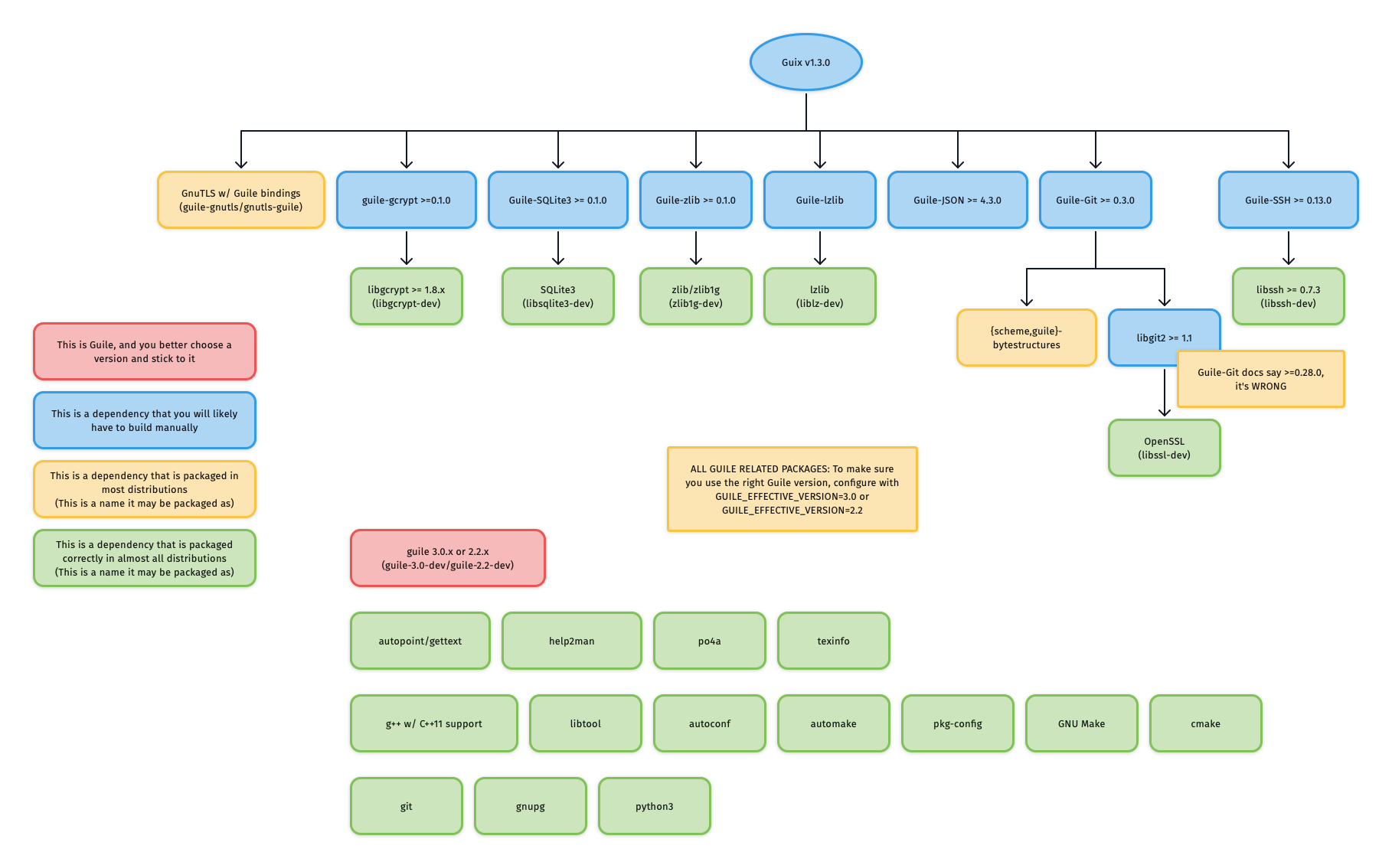
Building Guix from source is a rather involved process but a rewarding one for
those looking to minimize trust and maximize customizability (e.g. building a
+#### Consider /tmp on tmpfs
+
+If you use an NVME (SSD) drive, you may encounter [cryptic build errors](#coreutils-fail-teststail-2inotify-dir-recreate). Mounting a [tmpfs at /tmp](https://ubuntu.com/blog/data-driven-analysis-tmp-on-tmpfs) should prevent this and may improve performance as a bonus.
+
#### Guile
##### Choosing a Guile version and sticking to it
|-----------------------|---------------------|
| guile-gcrypt | libgcrypt-dev |
| guile-git | libgit2-dev |
+| guile-gnutls | (none) |
+| guile-json | (none) |
| guile-lzlib | liblz-dev |
| guile-ssh | libssh-dev |
| guile-sqlite3 | libsqlite3-dev |
```
git clone https://git.savannah.gnu.org/git/guix.git
cd guix
-```
-
-You will likely want to build the latest release, however, if the latest release
-when you're reading this is still 1.2.0 then you may want to use 95aca29 instead
-to avoid a problem in the GnuTLS test suite.
-
-```
git branch -a -l 'origin/version-*' # check for the latest release
git checkout <latest-release>
```
```
`guix pull` is quite a long process (especially if you're using
-`--no-substitute`). If you encounter build problems, please refer to the
+`--no-substitutes`). If you encounter build problems, please refer to the
[troubleshooting section](#troubleshooting).
Note that running a bare `guix pull` with no commit or branch specified will
systemctl start guix-daemon
```
+Remember to set `--no-substitutes` in `$libdir/systemd/system/guix-daemon.service` and other customizations if you used them for `guix-daemon-original.service`.
+
##### If you installed Guix via the Debian/Ubuntu distribution packages
You will need to create a `guix-daemon-latest` service which points to the new
times, it may be `/tmp/...drv-1` or `/tmp/...drv-2`. Always consult the build
failure output for the most accurate, up-to-date information.
+### openssl-1.1.1l and openssl-1.1.1n
+
+OpenSSL includes tests that will fail once some certificate has expired. A workaround
+is to change your system clock:
+
+```sh
+sudo timedatectl set-ntp no
+sudo date --set "28 may 2022 15:00:00"
+sudo --login guix build --cores=1 /gnu/store/g9alz81w4q03ncm542487xd001s6akd4-openssl-1.1.1l.drv
+sudo --login guix build --cores=1 /gnu/store/mw6ax0gk33gh082anrdrxp2flrbskxv6-openssl-1.1.1n.drv
+sudo timedatectl set-ntp yes
+```
+
### python(-minimal): [Errno 84] Invalid or incomplete multibyte or wide character
This error occurs when your `$TMPDIR` (default: /tmp) exists on a filesystem
as non-remote.
A relatively easy workaround to this is to make sure that a somewhat traditional
-filesystem is mounted at `/tmp` (where `guix-daemon` performs its builds). For
+filesystem is mounted at `/tmp` (where `guix-daemon` performs its builds), see [/tmp on tmpfs](#consider-tmp-on-tmpfs). For
Docker users, this might mean [using a volume][docker/volumes], [binding
mounting][docker/bind-mnt] from host, or (for those with enough RAM and swap)
[mounting a tmpfs][docker/tmpfs] using the `--tmpfs` flag.
Please see the following links for more details:
- An upstream coreutils bug has been filed: [debbugs#47940](https://debbugs.gnu.org/cgi/bugreport.cgi?bug=47940)
-- A Guix bug detailing the underlying problem has been filed: [guix-issues#47935](https://issues.guix.gnu.org/47935)
+- A Guix bug detailing the underlying problem has been filed: [guix-issues#47935](https://issues.guix.gnu.org/47935), [guix-issues#49985](https://issues.guix.gnu.org/49985#5)
- A commit to skip this test in Guix has been merged into the core-updates branch:
-[savannah/guix@6ba1058](https://git.savannah.gnu.org/cgit/guix.git/commit/?id=6ba1058df0c4ce5611c2367531ae5c3cdc729ab4)
+ [savannah/guix@6ba1058](https://git.savannah.gnu.org/cgit/guix.git/commit/?id=6ba1058df0c4ce5611c2367531ae5c3cdc729ab4)
[install-script]: #options-1-and-2-using-the-official-shell-installer-script-or-binary-tarball
[docker/volumes]: https://docs.docker.com/storage/volumes/
[docker/bind-mnt]: https://docs.docker.com/storage/bind-mounts/
[docker/tmpfs]: https://docs.docker.com/storage/tmpfs/
+
+# Purging/Uninstalling Guix
+
+In the extraordinarily rare case where you messed up your Guix installation in
+an irreversible way, you may want to completely purge Guix from your system and
+start over.
+
+1. Uninstall Guix itself according to the way you installed it (e.g. `sudo apt
+ purge guix` for Ubuntu packaging, `sudo make uninstall` for a build from source).
+2. Remove all build users and groups
+
+ You may check for relevant users and groups using:
+
+ ```
+ getent passwd | grep guix
+ getent group | grep guix
+ ```
+
+ Then, you may remove users and groups using:
+
+ ```
+ sudo userdel <user>
+ sudo groupdel <group>
+ ```
+
+3. Remove all possible Guix-related directories
+ - `/var/guix/`
+ - `/var/log/guix/`
+ - `/gnu/`
+ - `/etc/guix/`
+ - `/home/*/.config/guix/`
+ - `/home/*/.cache/guix/`
+ - `/home/*/.guix-profile/`
+ - `/root/.config/guix/`
+ - `/root/.cache/guix/`
+ - `/root/.guix-profile/`
- `/usr/local` if you installed Guix from source and didn't supply any
prefix-modifying flags to Guix's `./configure`
+For dongcarl's substitute server at https://guix.carldong.io, run as root:
+
+```sh
+wget -qO- 'https://guix.carldong.io/signing-key.pub' | guix archive --authorize
+```
+
#### Removing authorized keys
To remove previously authorized keys, simply edit `/etc/guix/acl` and remove the
Once its key is authorized, the official Guix build farm at
https://ci.guix.gnu.org is automatically used unless the `--no-substitutes` flag
is supplied. This default list of substitute servers is overridable both on a
-`guix-daemon` level and when you invoke `guix` commands.
+`guix-daemon` level and when you invoke `guix` commands. See examples below for
+the various ways of adding dongcarl's substitute server after having [authorized
+his signing key](#step-1-authorize-the-signing-keys).
+
+Change the **default list** of substitute servers by starting `guix-daemon` with
+the `--substitute-urls` option (you will likely need to edit your init script):
+
+```sh
+guix-daemon <cmd> --substitute-urls='https://guix.carldong.io https://ci.guix.gnu.org'
+```
+
+Override the default list of substitute servers by passing the
+`--substitute-urls` option for invocations of `guix` commands:
+
+```sh
+guix <cmd> --substitute-urls='https://guix.carldong.io https://ci.guix.gnu.org'
+```
+
+For scripts under `./contrib/guix`, set the `SUBSTITUTE_URLS` environment
+variable:
+
+```sh
+export SUBSTITUTE_URLS='https://guix.carldong.io https://ci.guix.gnu.org'
+```
## Option 2: Disabling substitutes on an ad-hoc basis
If you start `guix-daemon` using an init script, you can edit said script to
supply this flag.
-
-# Purging/Uninstalling Guix
-
-In the extraordinarily rare case where you messed up your Guix installation in
-an irreversible way, you may want to completely purge Guix from your system and
-start over.
-
-1. Uninstall Guix itself according to the way you installed it (e.g. `sudo apt
- purge guix` for Ubuntu packaging, `sudo make uninstall` for a build from source).
-2. Remove all build users and groups
-
- You may check for relevant users and groups using:
-
- ```
- getent passwd | grep guix
- getent group | grep guix
- ```
-
- Then, you may remove users and groups using:
-
- ```
- sudo userdel <user>
- sudo groupdel <group>
- ```
-
-3. Remove all possible Guix-related directories
- - `/var/guix/`
- - `/var/log/guix/`
- - `/gnu/`
- - `/etc/guix/`
- - `/home/*/.config/guix/`
- - `/home/*/.cache/guix/`
- - `/home/*/.guix-profile/`
- - `/root/.config/guix/`
- - `/root/.cache/guix/`
- - `/root/.guix-profile/`
-
[b17e]: https://bootstrappable.org/
[r12e/source-date-epoch]: https://reproducible-builds.org/docs/source-date-epoch/
-
-[guix/install.sh]: https://git.savannah.gnu.org/cgit/guix.git/plain/etc/guix-install.sh
-[guix/bin-install]: https://www.gnu.org/software/guix/manual/en/html_node/Binary-Installation.html
-[guix/env-setup]: https://www.gnu.org/software/guix/manual/en/html_node/Build-Environment-Setup.html
-[guix/substitutes]: https://www.gnu.org/software/guix/manual/en/html_node/Substitutes.html
-[guix/substitute-server-auth]: https://www.gnu.org/software/guix/manual/en/html_node/Substitute-Server-Authorization.html
-[guix/time-machine]: https://guix.gnu.org/manual/en/html_node/Invoking-guix-time_002dmachine.html
-
-[debian/guix-bullseye]: https://packages.debian.org/bullseye/guix
-[ubuntu/guix-hirsute]: https://packages.ubuntu.com/hirsute/guix
-[fanquake/guix-docker]: https://github.com/fanquake/core-review/tree/master/guix
-
[env-vars-list]: #recognized-environment-variables
 projects / gamesguru / feather.git / commitdiff